










The Ruby Reels casino login asks for two things only: the email address you registered with and your password. Enter them once and your account opens with your balance, your bonuses and every game in the lobby. Below we walk through each step, explain how to sign in from a phone and show what to do if a password goes missing. New to Ruby Reels? Use Create account first, then come back here.
Create accountRuby Reels Casino Login Step by Step
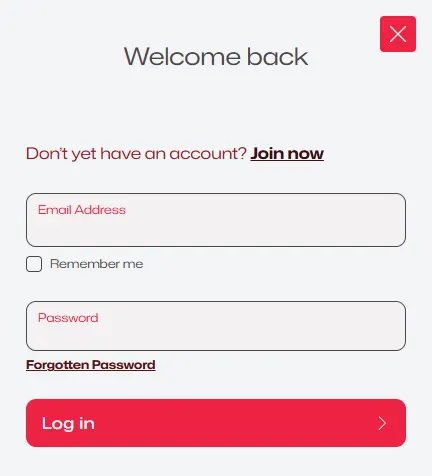
Signing in works the same on every screen. Here is the full path from our home page to your account:
- 1Press Log In in the top right corner of any page.
- 2A panel slides out with the heading "Welcome back".
- 3Type the email address linked to your account into the Email Address field.
- 4Enter your password in the Password field. Passwords are case-sensitive, so check that Caps Lock is off.
- 5Tick Remember me if you are on your own device and want to skip these steps next time.
- 6Press the red Log in button.
That is it – the panel closes and your account name replaces the sign-up buttons in the header. From there you can open the cashier, check the Promotions tab or go straight to the pokies.
If you see the line "Don't yet have an account? Join now" under the heading, you are in the right place but still need a profile. Joining takes a separate form; once it is done, the same email and password let you log in here.
Finished for the day? Sign out from the account menu, especially on a computer other people use. Signing out ends the session in that browser, and the next visit starts again from the Log In button. Your balance, bonus progress and Ruby Points are stored with the account, not the device, so nothing is lost when you leave.
Signing In on Mobile
There is no app to download. The site runs in the mobile browser you already use – Safari on an iPhone or iPad, Chrome or another browser on Android – and the Log In button sits in the same top corner as on a computer.
For a Ruby Reels casino login Australia players make from a phone, the steps match the desktop list above. The panel takes up the full width of the screen, and the keyboard opens as soon as you tap a field. On a personal phone, ticking Remember me saves time on later visits.
A few habits make mobile access smoother. Keep your browser updated, allow cookies for our site so the session can be kept, and avoid sharing a phone account with others if you leave Remember me switched on. On a shared or borrowed device, leave the box empty and sign out when you finish.

When the Login Does Not Work
Most failed sign-ins come down to a small detail. Before you contact us, run through this short list:
- Typo in the email. Make sure it is the same address you used when you registered, with no extra space at the end.
- Password case. Capital letters count. Turn off Caps Lock and type the password again.
- Old saved details. A browser may fill in an outdated password. Clear the field and type it by hand.
- Cookies blocked. If the panel keeps returning to the empty form, allow cookies for our site and try again.
- Slow connection. On weak mobile data, switch to Wi-Fi and reload the page.
Still stuck with your Ruby Reels login? Our support team is on live chat 24/7 and also answers by email. They can confirm which address your account uses and help if the account needs a check under our KYC Policy. For your own security, the team will never ask you to send your password in a chat or email.
Resetting a Forgotten Ruby Reels Password
A lost password is easy to replace, and your balance and bonuses stay as they were.
- 1Open the Log In panel and press Forgotten Password under the password field.
- 2Enter the email address of your account.
- 3We send you an email with a link to reset your password.
- 4Open the link, choose a new password and confirm it.
- 5Return to the panel and complete your Ruby Reels casino login with the new password.
No email in your inbox after a few minutes? Look in the spam or promotions folder, and check that you typed the address correctly. When you pick a new password, choose one you do not use on other sites – a mix of letters and numbers that is long enough to be hard to guess.
Ruby Reels Casino Login Questions
Do I need an app to log in?
No. Our casino runs in any modern mobile or desktop browser, so you sign in on the website itself.
Can I stay signed in on my own phone?
Yes. Tick Remember me in the Log In panel, and the next visit skips the email and password step. Leave it unticked on shared devices.
What should I do if the reset email does not arrive?
Check the spam folder first, then confirm the address. If it still has not arrived, write to us on live chat and we will look into it.
Where do I go after logging in?
Wherever you like: the cashier for a deposit, the Promotions tab for the week's offers, or your account settings, where you can set deposit, loss, wager and session limits or take a cool-off break.
Why might my account need a check after I sign in?
Under our KYC Policy we may ask you to confirm your personal and payment details, usually when a withdrawal is requested. If that happens, our support team explains exactly what is needed.
Is the Ruby Reels Casino login the same on desktop and mobile?
Yes. One account works everywhere, with the same email, the same password and the same balance on every device.